


Howbout: shared calendar
4.6586.00 Reviews
App Specs
- Version
- 16.2.0
- Updated On
- License
- Free
- Downloads
- 1,000,000+
- Developer
- Howbout
- Categories
- Social
- Platform
- Android, iOS
Screenshots

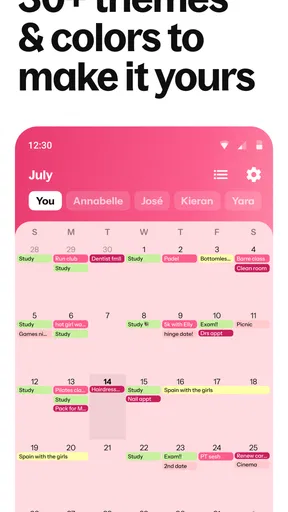
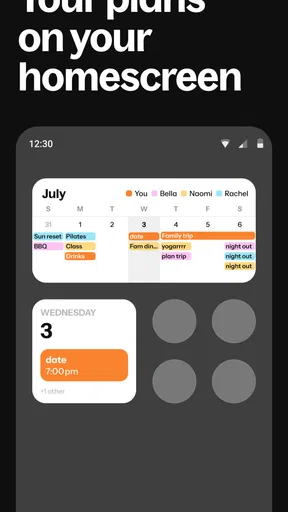
 Analysis by AppCompare
When a plan depends on several busy people, the hardest part is often not choosing the restaurant or activity—it’s getting a clear answer about timing. Group chats make it easy to throw out ideas, but replies arrive at different times, availability gets buried, and someone ends up asking the same question again. I like the idea behind Howbout: give those practical decisions a shared place, so making plans does not have to take over the conversation.
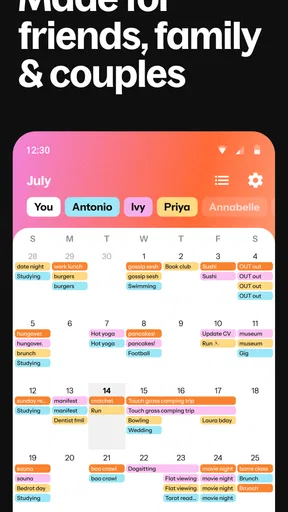
That distinction matters in everyday use. A calendar is usually where I go to protect time I have already committed; this one is aimed at the social step before that, when a group is still deciding what can work. It is most useful when friends want to spend time together but do not share the same routine. Rather than expecting one person to keep chasing replies, the group can use a common planning space and make the decision more visible.
When a shared plan is better than another message
I can see this working especially well for a recurring dinner group, friends arranging a weekend away, or relatives trying to coordinate a birthday. These are plans where several people need a say, but the conversation can become tiring if every person has to suggest dates one at a time. A shared calendar shifts some of that effort from social messaging into a clearer planning process.
It will not make a reluctant person answer, and it cannot resolve every disagreement about what to do. Its value is more modest and practical: it can help a group see the available choices and reach a decision without leaving the plan scattered across old messages. That is a useful change in communication rhythm, not a replacement for talking to each other.
Making the decision visible to everyone
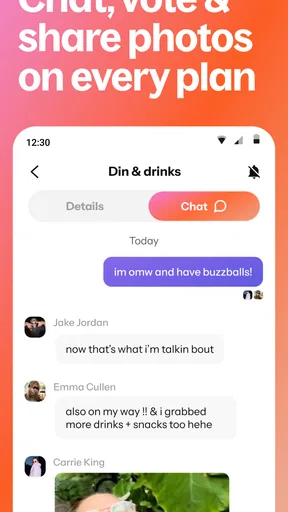
The most helpful workflow is to settle the question of timing before the chat gets pulled into smaller details. If a group is deciding between a few evenings, collecting preferences first gives people something concrete to respond to. Once a choice takes shape, event chat can keep the follow-up conversation close to that plan instead of making someone search through a separate messaging thread.
There is a small social benefit here: a visible choice can make it easier to notice whether a plan has enough interest to go ahead. It also gives quieter members a way to take part without needing to jump into a fast-moving group conversation. I would still use ordinary messages when a decision depends on nuance, but for simple availability, a shared planning space can reduce the number of times the same question needs to be asked.
Keeping the tool from becoming another demand
The trade-off is that a shared calendar only helps when the group actually uses it. If some friends respond in the app while others keep their plans entirely in chat, the organizer may still have to reconcile both places. I would introduce it for one specific event first, rather than asking a whole group to change its habits at once. That lets everyone see whether the extra step saves effort.
Worth Reading Before You Choose

EA SPORTS FC Mobile 26 Is a Bigger Football Game, but It Takes Time

Flipboard Shows What News Apps Must Do Beyond the Feed

Switching to Android Auto Means Rethinking Your Driving Routine

Google Calendar Makes a Crowded Week Easier to Manage

Ludo King Makes the Most of the Minutes Between Plans

Baby Panda World Brings Quick Play to Modern Phones, but Its Game Library Feels Busy
It is also worth thinking about how much availability you want to share. A social calendar can make coordination easier, but people may have different comfort levels around showing when they are busy or free. Keep shared details appropriate to the group and use the audience controls thoughtfully. For a plan that needs discretion, the organizer should be especially careful about who can see it and what gets written in the event conversation.
Who will get the most from it
I would recommend trying it if your plans regularly involve several people, dates are the main obstacle, and the group is willing to check one shared place. It is less compelling if you mostly arrange one-to-one meetups, already have a reliable way to coordinate, or prefer not to add a dedicated social tool to your phone. Someone managing a complex work schedule may still want a traditional calendar as their main system and use this only for group plans.
The app is free to download, with in-app purchases ranging from $3.99 to $39.99 per item. Howbout, the developer, focuses the product on social scheduling rather than positioning it as a universal work organizer. Its social category fits that purpose: the question it tries to answer is not simply what is on my calendar, but how can our group find a time?
Its audience is broad, with an Everyone age rating. It has a 4.6 average from around 18,000 ratings and more than a million installs, which suggests that shared planning has a clear appeal beyond a single kind of friend group. I would treat those figures as context, not a guarantee that every group will adopt it smoothly; the benefit still depends on people agreeing to use the same process.
Details worth checking before you settle in
If you are deciding whether it can fit alongside your existing routine, the practical question is how you want to divide responsibilities. I would keep a personal calendar as the place for appointments and commitments, then use the shared app for social decisions that need input from other people. That avoids turning a group tool into the single source of truth for every part of life, and it makes any synchronization friction less disruptive.
People also often wonder whether an app like this replaces a group chat. In my view, it does not need to. Use the calendar side for dates, attendance and event-specific details; keep casual conversation in the channel your friends already enjoy. The point is not to move every message, but to give the scheduling question a more stable home.
Another sensible question is whether everyone has to be equally enthusiastic. In practice, one organizer can start by inviting the people who make the decision, then share the outcome with the wider group. If the first attempt feels like extra admin, simplify the next one: propose fewer options, ask for a response by a clear point, and avoid duplicating every detail in multiple places. That is a useful way to test whether the shared workflow suits your circle.
Howbout is available on Android and iOS. The current version is 15.1.0, and it supports Android 8.0 and later. For someone deciding whether to install it, the more important question is not the version number but whether the people they plan with will participate. A shared calendar works best as a group habit, not as a clever app that one person maintains alone.
The Magic of Shared Calendars
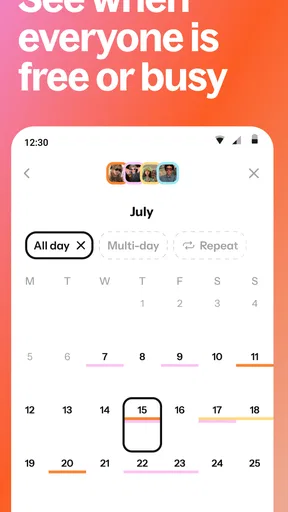
At its core, Howbout is a social calendar app designed to make planning with friends and family a breeze. Forget the back-and-forth texts; this app lets you see when everyone is free in real-time. You can create events, invite your pals, and see who’s in or out. It’s like a digital PA for your social life.
Setting Up: Easy Peasy Lemon Squeezy
Getting started with Howbout is as simple as pie. Download the app from the App Store or Google Play, sign up using your email, and boom—you’re in. The interface is super intuitive, with a clean design that doesn’t overwhelm you with unnecessary features. Just the good stuff.
Once in, you can link your existing calendars to keep everything in one place. It’s like having a superpower for organization. Within minutes, I had my work meetings, gym sessions, and brunch dates all synced up.
Features That Make Life Easier
This app is packed with features that make organizing group events a breeze. The standout has to be the ability to suggest multiple dates for an event and let everyone vote on their preferred option. It’s democracy at its finest! No more guesswork—just pick the date that works for everyone.
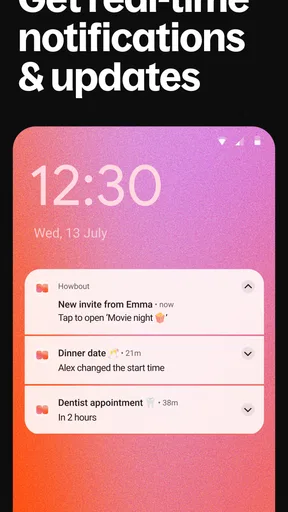
Another cool feature is the chat function within each event. No need to hop between messaging apps and your calendar. You can discuss the details, share links, and even add photos all in one spot. Plus, the app sends reminders so you’ll never miss an event again. Handy, right?
Why It Stands Out
What makes Howbout really shine is its focus on social events. While other calendar apps might be great for personal use, this one is all about group gatherings. It’s like having a personal party planner in your pocket. The app also integrates seamlessly with your phone’s contacts, making it super easy to invite friends to join in on the fun.
And if you’re worried about privacy, rest easy. You can control who sees which events, so your surprise party plans won’t be spoiled by prying eyes. It’s all about keeping your social calendar secure and under control.
A Few Things to Keep in Mind
Like any app, Howbout isn’t without its quirks. Occasionally, syncing can lag a bit, especially if you’ve got a ton of calendars connected. Also, while the app is fantastic for social events, it might not replace your all-in-one calendar if you need it for professional scheduling. But hey, it’s all about finding what works for you!
Final Thoughts
In a world where everyone is busier than ever, Howbout is the app we didn’t know we needed. It’s a game-changer for coordinating with friends and family, making it easier than ever to plan and enjoy time together. Whether it’s a casual dinner or a big birthday bash, this app has got your back.
So next time you’re planning a get-together, give Howbout a try. It might just become your favorite tool for keeping your social life on track and making sure you never miss a moment of fun. Trust me, your future self will thank you!
Pros
- User-friendly interface for all ages.
- Seamless integration with existing calendars.
- Real-time updates and notifications.
- Customizable event reminders.
- Group chat feature enhances communication.
Cons
- Limited offline functionality.
- Some features require premium upgrade.
- Occasional sync delays.
- Lacks advanced scheduling options.
- No desktop version available.
FAQs for Howbout: shared calendar
What is Howbout and how does it work?
Howbout is a shared calendar app designed to make planning and coordinating events with friends and family easy. It allows users to create events, share them with others, and collaborate on plans in real-time. The app integrates seamlessly with your device's calendar, ensuring you never miss an important date.
Is Howbout available on both Android and iOS?
Yes, Howbout is available for download on both Android and iOS platforms. You can find it on the Google Play Store for Android devices and the Apple App Store for iOS devices, making it accessible to a wide range of users who wish to streamline their event planning.
Does Howbout require an internet connection to function?
While you can view your calendar and events offline, an internet connection is necessary to sync updates and changes with other users. This ensures that all participants have the latest information about the events and can collaborate effectively, even when apart.
Can I use Howbout to manage both personal and professional events?
Absolutely. Howbout is versatile enough to handle both personal and professional scheduling needs. You can create separate calendars for different purposes or merge them, depending on your preference. The app’s intuitive design makes it easy to switch between various schedules seamlessly.
Is Howbout secure and does it protect my privacy?
Howbout takes user privacy seriously. It employs encryption and other security measures to protect your data. You control who has access to your events and personal information, ensuring your details are shared only with those you trust. Always review the app’s privacy policy for comprehensive details.


